bakebook
A recipe-development app for saving, baking, logging, and revising recipes.
AI recipe support · iOS build · solo project
Project Overview
Role
Solo UX/Product Designer & Developer
Timeline
UX/UI concept: June–July 2024
iOS redesign & development: July 2026–Present
Scope
User research, UX/UI design, prototyping, usability testing, front-end development, AI-assisted development, App Store preparation
Status
iOS release in progress; Android planned
Key insight: Bakers were not just looking for recipe storage. They needed a way to track changes, scale formulas, and return to previous versions without losing context.
Problem Summary
Most recipe tools help people save recipes, but they do not support the actual process of developing one. Bakers often make changes across multiple attempts by adjusting ingredients, methods, timing, and results, but those changes are easy to lose. Bakebook was designed around the loop of making, baking, logging, tweaking, and repeating.
Initial User Research
I conducted early user research with seven participants, ranging from hobby bakers to professional pastry chefs. The goal was to understand how bakers saved recipes, made changes, adjusted quantities, and returned to past work.
Key Findings from Research
bakebook is a mobile app designed to help bakers develop, store, scale, and revise recipes in one place. It began as a six-week UX/UI concept in 2024, where I led the project from research through final UI design. In July 2026, I revisited it as a fully coded solo product, rebuilding the app for iOS release and working through real product decisions around data structure, interaction details, edge cases, testing, and implementation.
Design Goal
Create a recipe-development tool that helps bakers save recipes, adjust quantities, track changes, and return to past versions without adding unnecessary complexity.
➜ This led me to prioritize searchable recipe storage, categories, and a clear recipe library.
➜ This led to the Log Book, where users can record date-stamped bakes, changes, results, and photos.
➜ This led me to prioritize ingredient scaling, unit flexibility, and recipe-development support.
Research also helped narrow the scope: collaboration mattered less than personal recipe development, storage, and revision.
1. Recipe storage was fragmented and easy to lose
Users wanted a centralized, searchable place to store recipes by type, ingredient, or cuisine.
2. Bakers needed to track edits during experimentation
Users often changed recipes while baking, but forgot exact measurements or notes later.
3. Scaling and substitutions created uncertainty
Users wanted help understanding how changing amounts or substituting ingredients might affect the final result.
Early ideation — I mapped core recipe actions, ingredient editing, category organization, notes, and Log Book features before moving into wireframes.
After the initial research, I mapped the core recipe workflow before moving into screens: saving recipes, editing ingredients, organizing categories, tracking bake logs, and returning to past versions. These early sketches helped define Bakebook as a recipe-development tool rather than a simple storage app.
The 2024 wireframes focused on the main product flows: adding recipes, browsing saved recipes, editing ingredients, recording notes, and keeping scaling tools close to the recipe itself. When I returned to build the coded version in 2026, these flows became the starting point for the product structure, even though many interaction details changed during development.
1. Searchable recipe library — Organize recipes by category, ingredient, or cuisine so users could find saved recipes quickly.
2. Log Book and recipe iteration — Give bakers a place to record changes, notes, results, and photos across multiple bakes.
3. Scaling and ingredient flexibility — Keep quantity, unit, and substitution tools close to the ingredient list so changes stayed connected to the recipe.
Usability Testing & Iteration
Early Structure & Wireframing
I tested the 2024 prototype with five participants across different baking experience levels. The goal was to evaluate whether users could add, edit, organize, and scale recipes without losing track of changes. The testing also revealed a larger need: users did not just want a place to store recipes; they wanted help making decisions while developing them.
Testing Tasks
Add a new recipe ➜ Iterate & revise recipe ➜ Scale recipe
bakebook is currently running on iOS through TestFlight, with App Store release in progress and Android planned next. The next phase is focused on launch readiness, continued real-device testing, refining butter’s recipe-editing behavior, and improving first-use onboarding.
How Testing Shaped the Product
Simplified ingredient entry
I reduced friction in the ingredient flow so adding and editing recipe details felt faster.
Made the Log Book central
Testing confirmed that recipe development needed a clear place for date-stamped bakes, changes, results, and photos.
Introduced butter as recipe support
The substitution feedback showed that users were leaving the app to answer baking questions. butter became a way to support those decisions inside the recipe itself, using the recipe’s ingredients, quantities, method, and notes.
Testing helped clarify that bakebook needed two layers: a structured place to save and track recipes, and an intelligent support layer for the moments when bakers are experimenting and unsure what to change next.
HiFi Design & Iteration
Visual Direction
I used warm neutrals, soft reds, and muted browns to reference old recipe books and handwritten kitchen notes while keeping the interface calm and readable.
Reusable Components
I developed reusable components for recipe cards, ingredient fields, buttons, input states, and scaling controls to keep the app consistent across recipe creation, editing, and storage flows.
The rule was simple: only add features that supported making, baking, logging, tweaking, or getting started faster.
Web-first build
I rebuilt bakebook as a web app first, then wrapped it for iOS. This gave me a fast feedback loop while still creating a path to App Store release.
Cloud storage and sync
Firebase supports accounts, saved recipes, photos, and cloud storage so users can access their work across devices.
Current Status & Next Steps
The 2026 rebuild turned bakebook from a prototype into a working product. I built the core flows around saving recipes, editing ingredients and methods, scaling formulas, using butter for recipe guidance and reviewable recipe edits, and tracking recipe development through the Log Book.
From prototype screens to working product
The 2024 prototype showed the core flows. The 2026 rebuild required working data, saved recipes, accounts, editing states, errors, and mobile behavior.
From recipe storage to recipe development
The Log Book became more central because bakebook is about tracking changes over time, not just saving finished recipes.
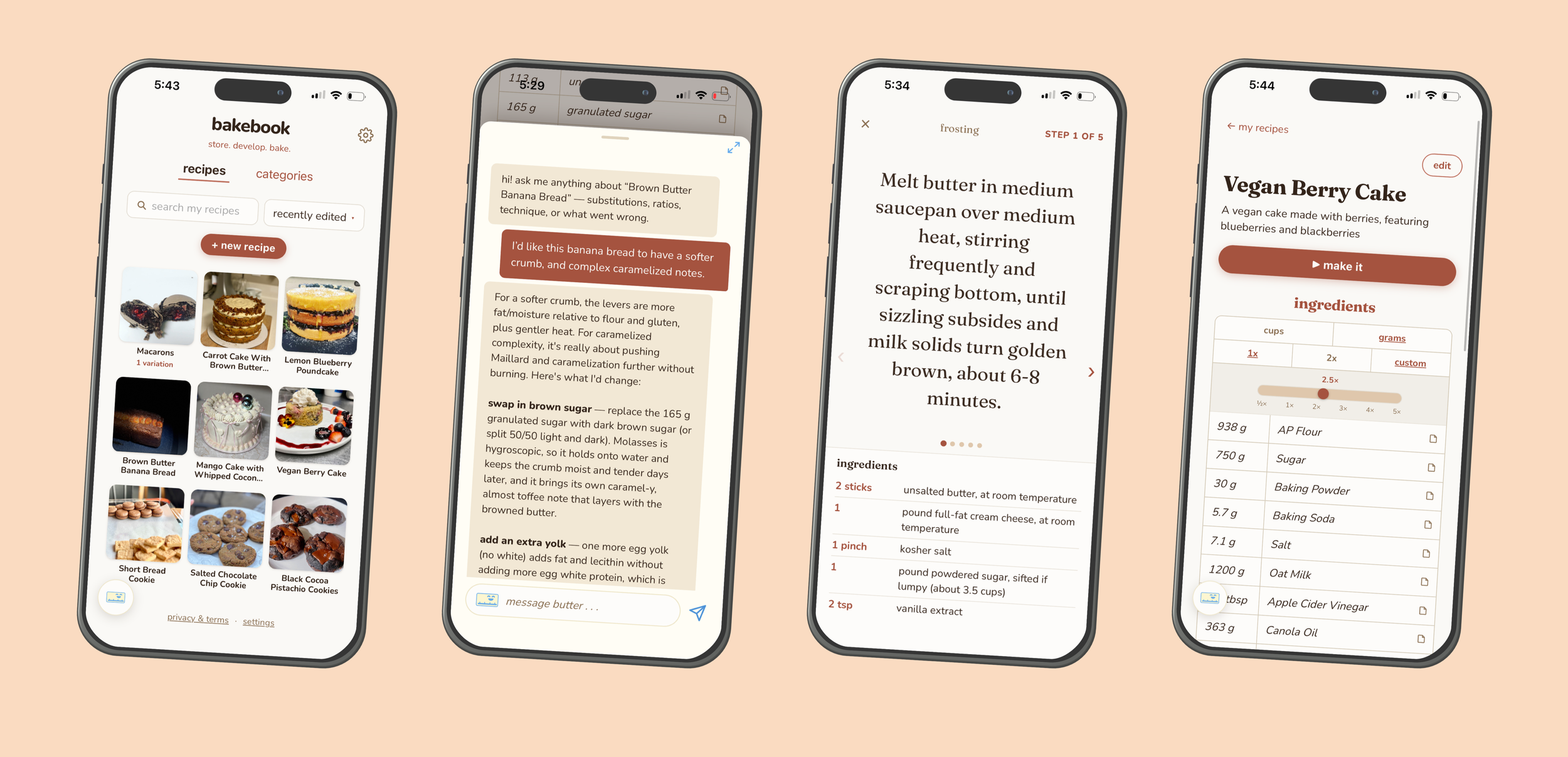
Make It mode
Follow large step-by-step instructions with ingredients still available below.
Defining the First Release
Before rebuilding, I narrowed the first release around the core recipe-development loop: save a recipe, bake it, log what changed, revise it, and return to it later. I kept the build focused on recipes, ingredients, scaling, categories, and the Log Book, while deferring ideas that did not directly support that loop.
Log Book
Track date-stamped bakes, ingredient changes, method changes, results, and photos over time.
Current Product Build
Reviewable recipe edits
Review suggested ingredient and method changes before applying them to the saved recipe.
Recipe components
Organize complex recipes into parts like cake, frosting, and assembly.
Recipe structure
Recipes had to support ingredients, methods, components, scaling, variations, photos, and Log Book entries without becoming duplicated or messy.
butter architecture
butter sends recipe context through a secure backend function before reaching Claude, which keeps the API key private and lets the app control what butter can read, suggest, and update.
Real-device testing changed the design
Safe areas, long text, tap targets, keyboard behavior, and scroll issues only became obvious once bakebook was running on an actual phone. Testing on-device became as important as checking the design in browser.
Future expansion
Android release
Public recipe sharing
Restaurant-scale recipe tools
Recipe costing and inventory features
Sync and saved data needed more care than expected
Saving recipes across devices created edge cases around updates, deletes, and Log Book entries. This became a key part of the build because users need to trust that their recipes and notes stay reliable.
Current status
iOS build running in TestFlight
App Store release in progress
Core recipe, Log Book, and butter flows working
An earlier version had been created with a visual app builder, but the exported code was incomplete and difficult to reuse. Rather than patch something I did not fully understand, I rebuilt bakebook from scratch so I could own the structure, interactions, and implementation decisions.
I wanted to learn how to build the product myself, not only design the interface. Rebuilding from scratch gave me a faster feedback loop and helped me understand how design decisions translated into working interactions, data, and edge cases.
From static assistant idea to contextual support
butter became part of the product direction because testing showed users wanted help with substitutions, scaling, and recipe decisions inside the workflow.
From polished screens to real-device testing
Building for iOS made spacing, safe areas, long text, tap targets, and edge cases much more important than they appeared in static mockups.
Included in first release
Recipe library
Search, sort, and browse saved recipes with visual recipe cards.
Together, these flows support the full recipe-development loop: save, bake, log, adjust, and return to the recipe with more context.
Building bakebook required turning design decisions into working product structure. I rebuilt the app in HTML, CSS, and JavaScript, wrapped it for iOS with Capacitor and Xcode, and used Firebase for accounts, saved recipes, photos, cloud sync, and backend functions.
Building the App
Data structure shaped the product
Features like components, variations, logs, and recipe edits depended on how recipe data was structured. Building the app made it clear that information architecture affects what the product can actually support, not just how screens are arranged.
Recipe creation
Ingredient & Method editing
Unit toggle / scaling
butter AI recipe assistant
Log Book
Basic recipe variations
Accounts
Cloud recipe storage
butter recipe guidance
Ask recipe-specific questions using the current recipe’s ingredients, method, and notes.
Deferred for later
Public recipe sharing
Multi-person accounts
Recipe costing tools
Restaurant-scale recipe development
Android release
Building bakebook required translating design decisions into working product structure: recipe data, accounts, sync, AI context, and real-device behavior. I rebuilt the app in HTML, CSS, and JavaScript, wrapped it for iOS with Capacitor and Xcode, and used Firebase for accounts, saved recipes, photos, cloud sync, and backend functions.
Implementation & Product Takeaways
Best viewed on mobile
Next refinements
Continue real-device testing
Refine butter’s editing and recommendation behavior
Improve onboarding and starter recipes
Log Book Feature
I added a log book to help users track recipe changes, dates, notes, and past versions over time.
Key Updates Based on User Feedback
Key Testing Insights
1. Adding ingredients took too many steps
Users understood the recipe creation flow, but ingredient entry felt slower than expected.
Result: This pushed me to simplify ingredient entry and think more carefully about how much work the app should ask users to do manually.
2. Recipe changes needed clearer tracking
Users wanted a better way to record changes, notes, and multiple attempts of the same recipe.
Result: This reinforced the Log Book as a core feature, giving users a place to record date-stamped bakes, changes, results, and photos.
3. Substitutions and adjustments sent users outside the app
Users were Googling substitutions and adjustments because the app could store recipes, but not yet help them understand what to change.
Result: This led to butter, an AI baking assistant that uses the full recipe context to explain substitutions, scaling, and adjustments without making users leave the recipe screen.
Streamlined Recipe Storage and Search
I clarified the recipe library and category views so users could find saved recipes more quickly.
Simplified Ingredient Selection
I made ingredient entry easier to scan and edit, reducing the friction users noticed during testing.
2026 iOS Redesign & Development
In July 2026, I returned to bakebook to rebuild it as a working product. The original prototype helped define the concept, but building the app for iOS required a different level of decision-making. I had to move beyond screens and think through data structure, account flows, ingredient editing, recipe storage, edge cases, mobile layout, testing, and App Store requirements.
Why I Rebuilt the App